Join More Than 50,000+ Subscribers and get latest camera news and rumors
NEW CAMERA VIDEOS ON YOUTUBE
|
By admin, on September 9th, 2025

The Canon C50 camera has been officially announced. The camera features impressive specifications, such as 7K open-gate internal RAW recording at 60 frames per second, 4K video recording at 120 frames per second and above all it also has a brand new detachable XLR top handle made by Canon specifically for more professional control and high-grade audio integration. The camera is scheduled to ship by the end of Q4 2025. This camera actually positions itself as one of the strongest competitor models like the Sony FX3. Now, the C50 is able to blend high-end video capabilities in a very lightweight design. This allows filmmakers and professional cinematographers to easily handle solo projects without the need for a team. If you are searching for the Canon C50 price, we have compiled the latest details based on the official announcement and the regional pricing variations. Kindly note that the announced kit includes the body with XLR handle, and no separate body-only price has been confirmed yet by retailers; the listed bundle package starts at $3,899 in the US and we will break down the Canon C50 price across several markets, accounting for all the taxes, currency conversions and potential regional differences and extra charges worldwide so let’s dive into the details.
1. Canon C50 Price in the USA
If you are living in the US, you have to pay $3,899. For the Canon C50 camera, pair it with the XLR handle. Suggest you have to click on the buy and at store link, and the camera is yours with the handle at the very same time. The regional pricing may vary depending on the state’s different tax structure.. Sales tax typically ranges from 0% (in states like Delaware or Oregon) to around 10% ( like we have in California or New York).
- Base Price: $3,899 [BODY only + XLR handle]
- With Average Tax (7%): Approximately $4,172 (calculated as $3,899 × 1.07)
- Price Difference Insight: The US price is often the baseline for global comparison.
Pre-orders are LIVE at B&H Store and Adorama Store, with no additional body-only option listed at launch.
2. Canon C50 Price in the UK
For someone in the UK, they have to pay a price of £3,359.99 for the Canon c50 camera alongside the XLR handle made by Canon itself. Obviously, the US pricing looks a bit lower when compared to the UK pricing since we have to add 20% VAT in the pricing, which is the value-added tax.
- Inclusive Price: £3,359.99 [BODY only + XLR handle]
- Ex-VAT Price: £2,799.99
- Price Difference Insight: It’s quite obvious that the UK price is around 15% higher than the US price when including taxes, so you have to pay a bit more when purchasing the camera in the UK. Why do you have to pay more? It’s primarily due to VAT and EU-adjacent import regulations post-Brexit.
3. Canon C50 Price in Japan
Well, in Japan, the numbers are a bit high, specifically due to the conversion ratio. The price of the Canon c50 in Japan is ¥558,000 (body with XLR handle, excluding tax). We have applied the latest 2025 exchange rate of $1 = ¥143. Japan’s 10% consumption tax would add about ¥55,800, bringing the total to ¥613,800.
- Estimated Base Price: ¥558,000 [BODY only + XLR handle]
- With Tax (10%): ¥613,800 (approx. $4,290 USD)
4. Canon C50 Price in Europe
Canon EOS C50 with XLR handle is listed at €3,899.99, inclusive of VAT (which averages 20-22% across EU countries, varying slightly—e.g., 19% in Germany, 21% in the Netherlands). Excluding VAT, this is about €3,249.99 (roughly $3,575 USD at €1 = $1.10 exchange rate)
- Inclusive Price: €3,899.99 [BODY only + XLR handle]
- Ex-VAT Price (Average): €3,249.99
- Price Difference Insight: Europe sees a 10-20% uplift compared to the US due to higher VAT rates and unified pricing across the EU.
Summary of Canon C50 Price Differences
To help visualise the variations, here’s a table comparing the estimated final consumer prices (including average taxes) and the percentage difference from the US base:
| Region |
Base Price (Local Currency) |
With Tax (Approx.) |
USD Equivalent (Approx.) |
% Difference from US ($4,172 with tax) |
| USA |
$3,899 |
$4,172 |
$4,172 |
Baseline |
| UK |
£3,360 |
£3,360 (inc. VAT) |
$4,402 |
+5.5% |
| Japan |
¥558,000 |
¥613,800 |
$4,290 |
+2.8% |
| Europe |
€3,900 |
€3,900 (inc. VAT) |
$4,290 |
+2.8% |
So all these calculations have been made on the approximate 2025 latest exchange rates (USD/GBP: 1.31, USD/JPY: 143, USD/EUR: 1.10, USD/INR: 84) and standard tax rates. The price does not always remain static; it varies due to the promotional offers, some personal offers by the retailer itself, as well as currency shifts and other adjustments. So this is the page for the Canon C50 pricing. If you want to see or explore the specification of the camera, you can visit here, and the official press release is mentioned here
f you want to get more updates related to Canon’s upcoming compact camera. GET LIVE NOTIFICATION, Select Your Trusted Source GET LIVE NOTIFICATION Click ON Check  BOX for Latest NEWS and Rumors BOX for Latest NEWS and Rumors
The article “Canon C50 Price: Detailed Breakdown for USA, UK, Japan and Europe” was written by thenewcamera.com team on 4:04 pm, Tuesday, 9 September 2025, Greenwich Mean Time (GMT) | You can also follow us on Our Official Social Media Handles FACEBOOK | TWITTER | INSTAGRAM to get live news — > get live Camera News + Canon Rumors 24X7.


By admin, on September 9th, 2025

Canon has now officially announced the Canon C50 Consumer-level Mirrorless camera. This is the official canon press release of the C50. The Canon C50 camera’s detailed specification is here
Canon C50 Press Release
Canon U.S.A. Announces New EOS C50 7K Full-Frame CMOS Sensor Cinema Camera and RF-Mount RF85mm F1.4 L VCM Hybrid Lens
Firmware updates for select Canon Cinema EOS cameras and new PowerShot ELPH 360 HS A camera also available
MELVILLE, NY, September 9, 2025 – Canon U.S.A., Inc., a leader in digital imaging solutions, is excited to introduce the new EOS C50 cinema camera, the newest addition to Canon’s cinema EOS system. The EOS C50 is a compact, full-frame cinema camera featuring a brand new 7K full-frame CMOS sensor, 7K 60P internal RAW recording and 32 megapixel still photo capture, making it a true hybrid camera. Weighing approximately one and a half pounds, the EOS C50 is Canon’s smallest and lightest cinema camera ever, making it ideal for handheld and verité shooting.
The lightweight design and hyper-mobile form factor the EOS C50 camera meets growing demands from shooters who are increasingly looking for compact, ergonomic cinema cameras for a variety of settings and shooting styles. Excellent for large and small scale productions, documentary shooting in the field, social media video creation, sports, and more, the EOS C50 camera features a detachable top handle which adds two full-size XLR audio inputs, a start-stop button, and a zoom rocker for unbeatable agility. It also features an RF-mount, lending it native compatibility with a wide variety of Canon lenses, such as the new RF85mm F1.4 L VCM Hybrid Lens.
EOS C50 Camera Recording Options
At the heart of the EOS C50 camera is the 7K full-frame CMOS sensor, which is capable of a Dual Base ISO of 800 and 6400 in Canon Log 2, and 12-bit Cinema RAW Light recording at up to 7K 60P. This powerful sensor is coupled with a DIGIC DV7 processor. The EOS C50 is the first camera in the Cinema EOS lineup to feature the full frame 3:2 open gate recording. In addition to Cinema RAW Light and the standard XF-AVC, the EOS C50 camera also features XF- AVC S and XF-HEVC S recording codecs, proving an easy-to-manage naming system and folder structure, all while preserving metadata and recording in the familiar MP4 format.
Social media shooters will enjoy that the EOS C50 camera is capable of simultaneous crop recording when shooting in 4K DCI or UHD, allowing you to record at a chosen aspect ratio while also recording a cropped portion of the frame in 2K. When shooting in simultaneous crop mode, the three format options include: 9:17, 9:16, or 1:1.
For those looking for camera connectivity, the EOS C50 camera supports XC protocol which allows for remote control over IP via Wi-Fi® or a compatible third-party USB-C ethernet adapter. The EOS C50 camera is also compatible with the Multi Camera Control App and features native integration of frame.io camera to cloud.
New RF-Mount RF85mm F1.4 L VCM Hybrid Lens
The new RF-Mount RF85mm F1.4 L VCM Hybrid lens is the latest addition to Canon’s line of VCM lenses, designed for shooters who increasingly are seeking powerful options whether shooting stills or video content. The RF85mm F1.4 L VCM has a focal length of 85mm, making it perfect for portrait-style shooting. The lens provides beautiful background blurring, as well as a F1.4 Maximum aperture, and well-controlled focus breathing.
Firmware Updates for EOS C400, C80, C70, and R5C Cameras
A new firmware update for select Canon Cinema EOS cameras bring in a few of these bleeding-edge features, available later this year. New firmware updates will enable full frame 3:2 open gate recording (EOS C400), view assist in media mode, quality improvement of focus peaking, improved assign buttons, improved Joy-Stick operability (EOS C80 and EOS C400), and more.
New PowerShot ELPH 360 HS A
Originally released in 2016, the PowerShot ELPH 360 HS still remains a popular compact camera. Appealing to fans of pocketable point and shoot style cameras, the newly updated PowerShot ELPH 360 HS A camera’s memory card slot will be changed from SD to microSD to help meet emerging needs in the compact camera market. The PowerShot ELPH 360 HS A camera will be available in two colors, black and silver.
Pricing and Availability
The Canon EOS C50 camera is currently scheduled to ship towards the end of Q4 of 2025 for an estimated retail price of $3,899.00*. The firmware updates for EOS C400, C80, C70, and the R5C cameras are currently scheduled to be available in Q4 of 2025.
Support us – Use or affiliate link Amazon.com | B&H Store | Adorama.com for the next purchase u make – it helps us 🙂
f you want to get more updates related to Canon’s upcoming compact camera. GET LIVE NOTIFICATION, Select Your Trusted Source GET LIVE NOTIFICATION Click ON Check BOX for Latest NEWS and Rumors
The article “Canon C50 Specifications” was written by thenewcamera.com team on 8:21 am,Tuesday, 9 September 2025, Greenwich Mean Time (GMT) | You can also follow us on Our Official Social Media Handles FACEBOOK | TWITTER | INSTAGRAM to get live news — > get live Camera News + Canon Rumors 24X7.
By admin, on September 4th, 2025
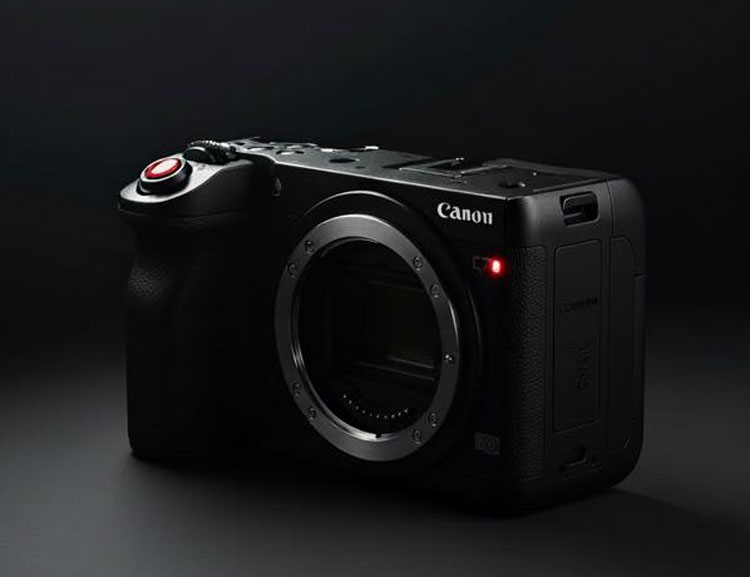
So obviously, the Canon C50 official announcement is on September 9, 2025, and just a few days away, our email, Twitter, and Facebook pages are getting images of the Canon C50. Obviously, most of them are fan-made, but some of them look so real that even I get confused sometimes. We have decided to share one with you, so you can also have an idea of what the Canon C50 will look like. Potentially one of the biggest Sony FX3 challengers is finally coming, and we don’t want to keep it to ourselves.
What Does the Fan-Made AI Image Show
The fan concept echoes the Canon C50 that we saw last week in the teaser. Every control looks very much the same. The camera with a minimalistic design without an electronic viewfinder, lots of custom controls, and threaded mounts all over the body for a perfect cinematic workflow experience.
The camera does have a boxy-style design, but with a very large and good hand grip that, even handheld, you can shoot exceptional images and videos.
The good thing is that, finally, we are getting IBIS in a Canon C50 camera alongside OpenGate recording. So, you can have creative freedom to use the camera handheld, without any compromise in the video quality. Obviously, the FX3 camera doesn’t support open gate recording yet. If you want to see or explore detailed core specifications related to the C50, you can look here.
Why We Have Picked This Image
We are getting a lot of leaked images from fans and subscribers, but we don’t post them here. The image of this one is looking very real, and it looks like it has been created by AI from a real image with some visual distortions, which has been done intentionally.
Canon C50 Rumors Recap – What We Know So Far
The sensor resolution of the Canon C50 is 32 megapixels, a full-frame CMOS sensor that records Open Gate videos. For detailed specification analysis of the upcoming camera, you can browse this post.
Pricing and Availability: The price range we are expecting is around $3,500–$4,000, making it accessible for indie filmmakers.
For more information, you can check our in-depth analysis of Canon C50 rumored specifications, and the B&H Store has already created a placeholder for Canon C50.
Disclaimer: This image is a fan-created AI concept and does not represent official Canon designs or leaks.
GET LIVE NOTIFICATION from Your Trusted Source GET LIVE NOTIFICATION Click ON Check BOX for Latest NEWS and Rumors
The article “Canon C50 Fan-Made AI Concept Image: A Creative Take on the Rumored Compact Cinema Powerhouse” was written by thenewcamera.com team on 12:35 pm, Thursday, 4 September 2025, Greenwich Mean Time (GMT) | Follow us for more updates and get LIVE RUMORS –> FACEBOOK | TWITTER | INSTAGRAM to get live news — > get live Camera News + Canon Rumors 24X7.
By admin, on August 29th, 2025

Canon G7 X Mark III restock has finally arrived bringing good news for photographers those who are actually waiting for a long time as of August 29 2025 the highly demandable compact camera from Canon the Canon PowerShot G7 X Mark III is back in stock at major retailers now this particular compact camera is very well known for its exceptional image quality and vlogging capability and it is also quite bit popular among content creators in the past so we are here at thenewcamera.com will give you the details about the Canon G7 X Mark III restock
Why the Canon G7 X Mark III Restock Matters
The Canon G7 X Mark III is a favourite camera among content creators those who loved to create high quality content, the Canon G7 X Mark III features 20.1MP 1-inch CMOS sensor, DIGIC 8 image processor, and a versatile 4.2x optical zoom lens (24-100mm equivalent), due to the large 1-inch sensor which is quite a bit bigger than the other regular compact cameras the low light performance is better as well as it offers up to 4K 30fps video recording and has a vari-angle display screen also you can use this camera to capture decent pics so it’s a hybrid compact camera from Canon.
Recently, due to supply chain issues and since Canon has stopped the production of this compact camera, the availability has become rare, so if you are searching for the Canon G7 X Mark III stock updates, you have come to the very right place. We have all the latest information that will help you to decide.

Canon G7 X Mark III Restock Availability and Pricing
The good news is the Canon G7 X Mark III camera restock is live at online stores, and you can find it G7X Mark III on Amazon.com now. The prices are quite high, which is about $1539 higher than the regular pricing, but despite its high price, a lot of people are still buying this compact camera.
Now if you feel the Canon G7 X Mark III camera is pricey right now then we also have some very good alternatives, specifically we are going to discuss about Canon V1 first, it’s a recent announcement by Canon and features a larger sensor and better video capability than the Canon G7 X Mark III so you can consider purchasing Canon V1 also instead of the Canon G7 X Mark III but before making your decision take a look at the quick specification comparison between the both.

Better Alternative at a Lower Price: Canon G7 X Mark III vs. Canon V1
For those exploring advanced options, the Canon PowerShot V1 is a newer video-first camera that competes with the Canon G7 X Mark III. Here’s a detailed comparison based on the latest specs:
| Feature |
Canon G7 X Mark III |
Canon PowerShot V1 |
| Sensor |
20.1MP 1″ CMOS |
22.3MP 1.4″ CMOS (Large Sensor) |
| AF syatem |
Contrast based |
Dual Pixel CMOS AF |
| Video Resolution |
4K UHD 60p (1.4x crop) |
4K 30p (full-width), 4K 60p (1.4x crop) |
| Video |
8bit, mp4 |
10Bbit, Clog available |
| Optical Zoom |
4.2x (24-100mm) |
3.1x (16-50mm) |
| Live Streaming |
Yes |
Yes (Full HD over USB/Wi-Fi) |
| Stabilization |
Optical IS + Digital IS |
Optical IS + Movie Digital IS |
| Cooling |
No / Limited recording time |
Active Cooling Fan |
| Audio |
Stereo Mic |
3-Mic Array + Mic/Headphone Jacks |
| Price (Current) |
~$1,539 |
$979 |
| Availability |
Available at Amazon |
Available at Amazon.com |
So you can notice the major differences between the two. The Canon PowerShot V1 camera features the latest generation 1.4-inch large sensor with a Dual Pixel CMOS autofocus system for faster focusing and active 3D tracking. At the very same time, you get 10-bit internal recording with a video resolution up to 4K 60 frames per second and also a built-in active cooling fan for longer video recording, like podcasts or long interviews.
Recommendation: Based on the current pricing scenario of the Canon G7 X Mark III camera, it’s better to invest in an advanced model like the Canon PowerShot V1. The Canon V1 features better core specifications and is suitable for both still and video work if you’re looking for a Canon premium compact camera.

Comparing Canon G7 X Mark III vs. Canon PowerShot V10
If you are looking for more budget options then we do have one additional option and the name of the camera is the Canon PowerShot V10, it may look quite a bit different but it is made for content creation and features exactly the same sensor inside we have in the Canon G7 X Mark III camera, take a look at the quick comparison between the two.
For those exploring alternatives, the Canon PowerShot V10 is a newer vlogging-focused camera that stacks up interestingly against the Canon G7 X Mark III. Here’s a detailed comparison to help you choose:
| Feature |
Canon G7 X Mark III |
Canon PowerShot V10 |
| Sensor |
20.1MP 1″ CMOS |
20.9MP 1″ CMOS |
| Video Resolution |
4K UHD |
4K UHD |
| Optical Zoom |
4.2x (24-100mm) |
4.3x (19-82mm) |
| Live Streaming |
Yes |
Yes |
| Built-in Stand |
No |
Yes |
| Audio |
Stereo Mic |
Directional Mic |
| Price (Current) |
~$1,539 |
~$429-$469 |
| Availability |
In Stock on Amazon |
In Stock on Amazon |
Obviously, the Canon G7 X Mark III camera design-wise looks better, spec-wise it also has a slightly better display screen and brighter lens. At the very same time, if you are looking for a budget option, then without a doubt, the V10 is also quite popular right now among content creators, and the biggest advantage of the V10 is obviously the budget factor.
Final Thoughts for the Canon G7 X Mark III Restock
The Canon G7 X Mark III has finally restocked, and it’s a win-win situation for those who were looking for their favourite Canon G7 X Mark III camera for a long time and were not able to find it in online stores. But at the very same time, if you feel the restocked Canon G7 X Mark III camera is pricey, then the best alternative to the Canon PowerShot G7 X Mark III camera is the Canon PowerShot V1 itself, with the large sensor, Dual Pixel CMOS autofocus system, and 10-bit video recording.
ABout the author: The article “Canon G7X Mark III Restock – Latest Updates and Where to Buy in 2025” written and updated by thenewcamera.com team on 10:34 am, Thursday, 25 September 2025, Greenwich Mean Time (GMT) | Follow us for more updates and Get LIVE RUMORS –> FACEBOOK | TWITTER | INSTAGRAM to get live news — > get live Camera News + Canon Rumors 24X7.

Nikon Coolpix S6900 Top 5 Best Alternatives in 2025

By admin, on August 20th, 2025

August 20, 2025 – Canon has announced the discontinuation of the standard EOS Webcam Utility. What you have now is Canon integrating its features into the more robust EOS Webcam Utility Pro (version 2.3f). This is a very strategic move by Canon, which includes both free and premium plans in a single software package. In this new update, Canon is offering users a seamless experience with a freemium model, which actually encourages users to upgrade to unlock advanced features. Canon is the number one camera maker in the world, and this strategic move will likely influence other camera makers too. The new software update offers streaming solutions catering to content creators, vloggers, as well as professionals.
What’s new with the EOS Webcam Utility Pro?
As of August 20, 2025, the original EOS Webcam Utility has been fully replaced by the EOS Webcam Utility Pro. Now, you don’t have to worry, since the free version retains all the basic functionality of the original utility—so it ensures your accessibility to the features that you were already using. And if you don’t require advanced features, there’s no need for an upgrade.
But yes, if you’d love to have an advanced set of features (described below), you will need a paid subscription—this will elevate your entire streaming and video production process.
According to Canon USA, the EOS Webcam Utility Pro subscription offers:
- Multiple Camera Connections: Connect up to five cameras for dynamic multi-angle streaming.
- Wireless Connectivity: Streamline your setup with wireless camera connections (supported on select models).
- High-Resolution Upscaling: Achieve Full HD 1080p and up to 60fps for smoother, crisper visuals.
- Multi-Channel Output: Stream to multiple platforms simultaneously—perfect for live content creators.
- Advanced Camera Control: Adjust settings directly from the app, including image quality, cropping, flipping, and resizing.
- Creative Features: Add text overlays, watermarks, JPEG/PNG images, and scene transitions for professional-grade production.
- Third-Party Integration: Support for Elgato Stream Deck and dynamic drivers (Windows only) for enhanced workflow efficiency.
- Background Blur/Removal: Create polished visuals with customizable backgrounds.
- Template and Hotkey Support: Save time with reusable templates and customizable hotkeys.
The subscription is priced at $4.99/month or $49.99/year. The subscription doesn’t cost a lot according to Canon. If you love to upscale your workflow and are seeking professional-grade streaming capabilities without investing in additional hardware like HDMI capture cards, it’s a great option.
Supported Canon Cameras
The best thing about the new update is that it supports the entire range of Canon cameras, starting from their DSLRs to modern-day mirrorless, including the EOS M-series cameras. Even though Canon has discontinued making its DSLR or EOS M-series cameras, they are still supported. If you’d like to buy the subscription, you can.
Here is the list of cameras supported by the new EOS Webcam Utility Pro:
EOS Webcam Utility Pro supports an extensive range of Canon cameras—from legacy DSLRs to modern mirrorless models—ensuring compatibility for both new and longtime Canon users. The supported cameras include:
- EOS-1D Series: EOS-1D X Mark II, EOS-1D X Mark III
- EOS 5D Series: EOS 5D Mark II, EOS 5DS, EOS 5DS R
- EOS 6D Series: EOS 6D, EOS 6D Mark II
- EOS 7D Series: EOS 7D Mark II
- EOS 70/80/90 Series: EOS 77D, EOS 80D, EOS 90D
- EOS M Series: EOS M200, EOS M50, EOS M50 Mark II, EOS M6 Mark II
- EOS R Series: EOS R, EOS R1, EOS R3, EOS R5, EOS R5 Mark II, EOS R6, EOS R6 Mark II, EOS R7, EOS R8, EOS R10, EOS R50, EOS R50 V, EOS R100, EOS Ra, EOS RP
- EOS Rebel Series: EOS Rebel SL2, SL3, T6, T6i, T6s, T7, T7i, T8i, T100
- PowerShot Series: PowerShot SX70 HS, PowerShot G5X Mark II, PowerShot G7X Mark III, PowerShot V1, PowerShot V10
This broad compatibility ensures that even owners of older Canon cameras—such as the EOS 5D Mark II or Rebel T6—can leverage modern streaming features, extending the lifespan of their gear.
Free vs. Paid Features
Here’s a breakdown of the features available in the free and paid versions of EOS Webcam Utility Pro:
| Feature |
Free (Basic) |
Paid (Pro Subscription) |
| Default Scene (One Camera) |
✓ |
✓ |
| User Custom Scene |
✗ |
Multiple |
| Multiple Camera Connection |
1 unit |
Up to 5 devices |
| Wireless Connection |
✗ |
✓ (1 unit) |
| Stream to Multiple Channels |
✗ |
✓ |
| UVC Video Input Support |
✗ |
✓ |
| Change Camera Settings |
On-camera only |
Via app |
| Image Quality Adjustment |
✗ |
✓ |
| Scene Layout Editing |
✗ |
✓ |
| HD 720p Upscaling |
✓ |
✓ |
| Full HD 1080p Upscaling |
✗ |
✓ |
| Up to 60fps Support |
✗ |
✓ |
| Video Layout Options (Fill/Fit) |
✗ |
✓ |
| Crop/Flip/Rotate/Resize Video |
✗ |
✓ |
| Insert Images (JPEG, PNG) |
✗ |
✓ |
| Watermark Insertion |
✗ |
✓ |
| Scene Transitions (Crossfades) |
✗ |
✓ |
| Hotkey Settings |
✗ |
✓ |
| Screen Capture |
✗ |
✓ |
| Text Overlay |
✗ |
✓ |
| Dynamic Driver (Windows) |
✗ |
✓ |
| Elgato Stream Deck Support |
✗ |
✓ |
| Template Support |
✗ |
✓ |
| Language Support |
✗ |
✓ |
| Battery Indicator |
✗ |
✓ |
| Background Blur/Removal |
✗ |
✓ |
Why Choose EOS Webcam Utility Pro?
While we do have some open-source alternatives like OBS Studio that offer excellent streaming capabilities, they do require additional hardware, such as an HDMI capture card. Also, support is limited to a specific set of Canon cameras due to the requirement of a clean HDMI output.
So, if your camera does provide clean HDMI output, you can use a capture card and the free, open-source OBS Studio software to stream completely free — without spending a single penny monthly.
Now, in contrast, we have Canon’s new EOS Webcam Utility and Pro service, which provide a kind of plug-and-play solution — even with wireless connectivity and app-based camera control. This eliminates the need for extra wires, HDMI cables, or dealing with third-party applications that might be a bit complex for new users.
But for all of this, you have to pay a monthly subscription fee.
The subscription model has sparked some debate, especially among professional camera users like those using the Canon R5 Mark II or Canon R1. Many of them are asking — “Why, Canon, why?” — since they’re already spending so much on camera bodies and lenses.
Our Take
Canon’s decision this season to merge the EOS Webcam Utility with the Pro version is obviously a very smart move. It successfully balances accessibility with premium functionality.
The free version ensures that casual users — those who just want to use their Canon camera for basic streaming — still have access. But for those who want advanced features like wireless streaming, multi-camera setups, image upscaling, and more, there’s a $4.99/month plan.
This cost is reasonable, not too high—especially for creators who completely rely on the Canon ecosystem for high-end video production.
And obviously, if you’re irritated by the idea of a subscription, you still have great open-source tools like OBS Studio that remain valuable and completely free to use.
But, as always, I have to say — Canon’s all-in-one solution is hard to beat.
We recommend: If you’ve already invested so much in Canon cameras and lenses, you can simply try a 1-month or 2-month subscription. If you don’t like it — don’t continue. But if you find that it adds value to your workflow, then it’s worth keeping.
ABout the author: The article “Canon New Compact Cinema EOS Camera: What to Expect in September 2025” written and updated by thenewcamera.com team on 4:08 pm, Friday, 15 August 2025, Greenwich Mean Time (GMT) | Follow us for more updates and Get LIVE RUMORS –> FACEBOOK | TWITTER | INSTAGRAM to get live news — > get live Camera News + Canon Rumors 24X7.
By admin, on August 10th, 2025

TNC Exclusive – We are all waiting for the Sony A7V camera announcement, and not only that, we are also eagerly waiting for the Sony A7S IV. These two cameras need to be updated as soon as possible by Sony. As of August 10, 2025, an anonymous source has dropped some exclusive information into our mailbox at TheNewCamera.com, shedding light on the upcoming Sony A7V, FX3 Mark II, and potentially the Sony A7S IV camera, related to all these models. The insider provided a kind of detailed information related to the sensor and the video capabilities, and we have decided to publish it since it does look legitimate to us.
At the very same time, while these sorts of unverified rumors are subject to change from time to time, they do offer valuable insights to those who love to track the latest information related to the Sony A7V rumors, latest specifications, or information related to the Sony A7S IV camera. Below is the analysis and the quotation of the email, and we have done a sort of professional analysis to the content of the email — so let’s jump into it.
Insider email leak – Direct quote from the source on Sony A7V and A7S IV camera development
Today, on August 10, 2025, we have received this detailed message from a source which is quite familiar with Sony’s prototyping process:
“The new Sony A7V might be using the same sensor as Z8/Z9 modified and slightly cheaper, since the exclusivity use for the sensor will expire before announcement.
44 MP stacked not the same as Panasonic 44 MP not stacked.
If they don’t go this route it might be completely new sensor. They have several prototypes at the moment. The 44 MP non stacked is faster than regular A7IV but slow in general. We will see.
FX3II / A7S IV is 24 MP as far as I know, comes with a fully stacked sensor and with 2-layer transistors. Same sensor will be used in FX6 II, triple ISO around 800 – 4000 – 25600, night specialist.
6K open gate 120 no crop, 4K open gate 120 fps oversampled from 6K open gate 120fps no crop.
That is all, release date this year or early next year if plans do not change. If they change, we will see.”
So this is intel highlighted that has been shared with us, so let’s break down the interesting set of information one by one.
Breaking down the Sony A7V rumor – sensor prototypes and performance upgrades
Let’s analyze the input according to the latest rumor. The Sony A7V camera has multiple prototypes, and this is quite common when we are talking about high-end or semi-professional cameras like the Sony A7V, before they finally enter a production line. The primary rumor centers on a modified 44-megapixel stacked sensor, which is almost the same as that used in the Nikon Z8 and Z9, but entirely adapted for the Sony ecosystem. The source has clearly mentioned that with Nikon’s exclusivity expiring soon, this could be a more cost-effective implementation, potentially putting the Sony A7V in direct competition with the existing Nikon Z8 — a kind of higher-resolution powerhouse for still photographers. The source has also said it has faster readout speeds to minimize rolling shutter in video, and it is a very clear indication the new 44MP sensor will break the Sony limitation barrier of continuous shooting abilities, as we have seen with the Sony A7IV camera, which is limited to 11 frames per second.
Alternatively, the source also mentions that a brand-new 44-megapixel non-stacked sensor exists, but it remains slow in general, suggesting it may help the Sony A7 series expand resolution-wise in stills and video but will keep the limits of continuous shooting speed or higher frame rates in video to protect higher-end model sales.
This set of information suggests that Sony is testing multiple prototypes of the Sony A7V camera with two different 44MP sensors. Yes, the AI chip is coming this year, which will further enhance the autofocus system of the A7 series cameras — possibly even better than the existing Canon offerings in their Canon R6 Mark II camera.
But, it’s interesting he doesn’t talk about 33 MP stacked CMOS sensor, which was rumored earlier
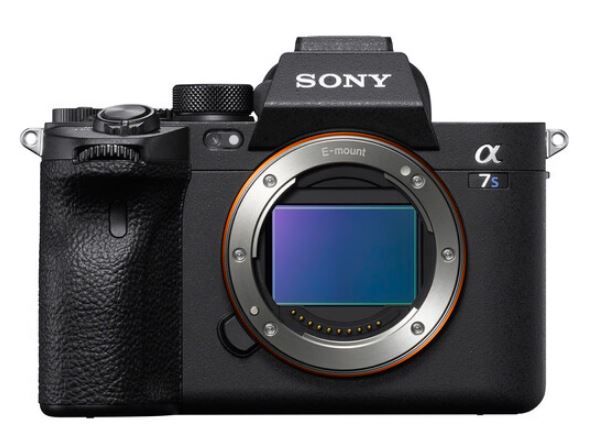
Sony FX3 Mark II / Sony A7S IV rumors decoded – stacked sensors, triple ISO, and cinema-grade video
Now the sensor description of the Sony FX3 Mark II and the Sony A7S IV camera is quite a bit more complex than what we have discussed earlier for the Sony A7V. According to the source, the Sony FX3 Mark II camera or the A7S IV will feature a 24-megapixel fully stacked sensor, and the sensor will incorporate dual-layer transistors — a step up in the efficiency of light gathering as well as data processing capability.
This sensor is also stated to be used in the upcoming Sony FX6 Mark II camera, creating a cohesive ecosystem for professional videographers starting from the Sony A7S IV.
The triple base ISO, which is said to start from 800, 4000, and 25600, means it can easily be tagged as a low-light king or night specialist camera, promising superior low-light performance and a good update from the existing Sony A7S III’s ultra-low-light-sensitive 12MP sensor. Specification-wise, the sensor is able to record 6K open gate at 120 frames per second without any significant crop. This allows professional videographers to capture highly detailed data without any lag or crop.
If this information is true, the upcoming Sony A7S IV, FX3 Mark II, and FX6 Mark II cameras will revolutionize filmmaking with their ultra-high-speed 24MP sensors and amazing low-light performance. The Sony FX3 series as well as the A7S series have always remained a popular choice among filmmakers, and if the above specs are true, they will continue to dominate.
Sony A7 V – Sony A7S IV Release Timeline
The source mentions the release of the Sony cameras in late 2025 and early 2026 if they remain on schedule, if their plans remain unchanged. This suggested date aligns with Sony’s refresh cycle, which generally occurs in the fourth quarter of the year.
However, as we have discussed, a lot of camera specifications depend on beta testers’ reports — what they like and what they don’t like — so everything gets fine-tuned in the final production line version of the camera.
Sony A7V versus Sony FX3 Mark II / Sony A7S IV versus competitors – a quick specification comparison table based on the rumored information we have
To visualize the rumored advancements, here’s a professional comparison table pitting the leaks against benchmarks like the Nikon Z8:
| Feature |
Sony A7V (Rumored) |
Sony FX3II/A7S IV (Rumored) |
Current Competitors (e.g., Nikon Z8) |
| Sensor |
44MP stacked (modified Z8/Z9-like) or new prototype; faster than A7IV |
24MP fully stacked w/ 2-layer transistors; triple ISO (800/4000/25600) |
45.7MP stacked CMOS |
| Video |
Not specified in leak |
6K open gate 120fps no crop; 4K 120fps oversampled |
8K 60fps, 4K 120fps |
| Key Strengths |
Affordable high-res, prototypes for flexibility |
Night/low-light specialist, cinema-grade |
High-speed readout, no blackout |
| Release |
Late 2025 or early 2026 |
Late 2025 or early 2026 |
Already available |
| Price Speculation |
Slightly cheaper than exclusives |
Not specified |
~$4,000 |
Final thoughts about Sony A7V and Sony A7S IV/FX3II rumors
We have decided to put the insider information directly in our post without altering it, to make everything as transparent as possible for you. At the same time, we have also added our analysis on what we think about this set of information. Stay tuned to TheNewCamera.com for more information related to upcoming cameras and lenses.
Hope you enjoyed reading this article, At TheNewCamera.com, we’re dedicated to keeping you informed about the latest camera news. The article “Kodak FZ45, FHD 44MP and Kodak FZ55 – Amazon UK Best Selling Compacts of 2025” was published on11:54 am, Sunday, 10 August 2025, Greenwich Mean Time (GMT) by thenewcamera.com team | Follow us on our social pages FACEBOOK | TWITTER | INSTAGRAM to get live Camera News + see more Sony Alpha Rumor


By admin, on August 5th, 2025

If you are looking for the best drone for 2025, then we have selected the top 10 selling drones available in October 2025, and all these drones are 4+ star-rated drones with more than 1000 reviews by their buyers. So, depending upon your specifications, buy any of these top 10 best-selling drones available in October 2025.
Why Choose a Drone from Amazon’s Best Sellers in 2025?
Most of the drones listed in our list feature 4K Ultra HD recording with GPS navigation and long-range FPV transmission. Out of these, approximately 7 to 8 of them are under 249g, and we are going to specifically list the lightweight drones in the List below. The entire list comprises budget to premium models, making it perfect for both beginners and professionals.

1. DJI Mini 4K – The Best Budget 4K Drone for Beginners in 2025
The DJI Mini 4K is currently the top-selling drone on Amazon USA, with more than 1800+ 4.5-star reviews by its users. The drone is under 249 grams, so you don’t have to get any extra access permit or install any of those USA government-based apps to get airspace clearance. You can fly this right away without thinking of anything else, since under-249-gram drones don’t require any specific permission. As for the specs, the DJI Mini 4K offers 4K Ultra HD recording, 3-axis gimbal stabilization for smooth video recording, up to 10 km of radio transmission, up to 31 minutes of flight time, and intelligent flight modes. A perfect drone for beginners.
- Key Features: 4K UHD camera, 10km transmission, auto return, wind resistance
- Rating: 4.5/5 (1,812 reviews)
- Price: Starting at $299.00 Amazon.com
- Why Buy?: Affordable, lightweight, and packed with professional-grade features.
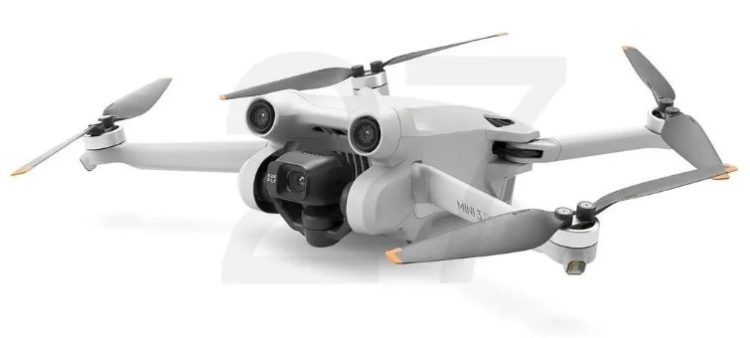
2. DJI Mini 3 Fly More Combo – Longest Flight Time
The DJI Mini 3 Fly More Combo is one of my favorite drones. It offers approximately 140 minutes of total flight time with three batteries and allows you to record 4K Ultra HD video and vertical shooting. Specifically, if you want your drone to stay in the air for a longer period, then this is an ideal travel vlogging and content creator drone for extended aerial sessions. The best part is even this drone falls under the 249g lightweight category, so you can easily fly this without needing any permission.
- Key Features: 4K camera, 114-minute flight time, vertical shooting, lightweight
- Rating: 4.5/5 (4,724 reviews)
- Price: Starting at $719.00 at Amazon.com
- Why Buy?: Extended battery life and robust features for creative professionals.

3. DJI Neo – The Best Selfie Drone for Vloggers
Why is the DJI Neo called the best selfie drone for vloggers? The big reason is the drone weighs only 135 grams and it’s a kind of self-flying drone. It can easily take off from your palm, and most importantly, it has a built-in subject tracking feature, so it will track you wherever you go while recording 4K Ultra HD videos — without the need for any controller. Whether you are riding a bike, in a car, or just walking nearby, this drone follows you and records your activities in a cinematic way.
- Key Features: 4K camera, palm takeoff, subject tracking, built-in propeller guard
- Rating: 4.4/5 (6,475 reviews)
- Price: Starting at $197.01 at Amazon.com
- Why Buy?: Ultra-lightweight and user-friendly for social media content creation.
4. 1080P Full HD Foldable Drone – Best Budget Drone for Beginners
The 1080P Full HD Foldable Drone is the 4th most popular drone on Amazon.com. If you are a beginner and looking for a drone under $50, then this one is the best find for you. At this price, more than 2000+ users have reviewed this drone with a 4.2-star positive rating, which is quite high for a drone at this price point.
- Key Features: 1080P camera, one-key takeoff/landing, 3-speed modes
- Rating: 4.2/5 (2,380 reviews)
- Price: Starting at $40.49 at Amazon.com
- Why Buy?: Budget-friendly with fun features for new pilots.
5. DJI Mini 4 Pro Fly More Combo – The Best Premium Lightweight Drone
The DJI Mini 4 Pro Fly More Combo gives you 102 minutes of flight time with its three batteries and built-in 4K HDR mode. It weighs under 249 grams. So, if you’re looking for a professional-quality drone that doesn’t require any sort of permissions before flight, the DJI Mini 4 Pro Fly More Combo is the best premium lightweight drone. The drone also features advanced omnidirectional obstacle avoidance as well as smart return-to-home — all the features you would see in a professional-grade drone.
- Key Features: 4K HDR, 102-min flight time, obstacle avoidance, RC 2 controller
- Rating: 4.5/5 (5,822 reviews)
- Price: Starting at $1,645.00 Amazon.com
- Why Buy?: Premium features in a lightweight, regulation-friendly package.

6. DJI Flip (RC-N3) – The Best Drone for Long-Range Transmission
The DJI Flip RC-N3 features approximately 13 km of video transmission range and records 4K Ultra HD video. It is so small that it can easily take off from your palm. It also has an auto-return feature. More or less, this is one of the best ultra-lightweight drones for long-range transmission purposes. You’ll get approximately 31 minutes of total flight time.
- Key Features: 4K camera, 13km transmission, palm takeoff, 31-minute flight
- Rating: 4.5/5 (898 reviews)
- Price: Starting at $434.61 Amazon.com
- Why Buy?: Exceptional range for capturing distant landscapes.
7. 1080P Full HD Camera Drone for Beginners
This under-$50 drone is quite popular and appears a second time in our list. We have to keep it since it is again one of the best popular drones among beginners who want to try out drones without spending a chunk of money. The Full HD drone features voice control, gesture selfie, and altitude hold — and obviously, it falls under the lightweight category.
- Key Features: 1080P camera, voice control, 3D flips, two batteries
- Rating: 4.2/5 (3,471 reviews)
- Price: Starting at $44.99 Amazon.com
- Why Buy?: Simple controls and affordable for first-time flyers.
8. Q9s Drone for Kids – The Best Drone for Young Pilots
The Q9s Drone is a kid-friendly quadcopter. It’s available for approximately $31.98. At the same time, you are also getting propeller guards for safety. A very good drone for young pilots.
- Key Features: Altitude hold, headless mode, propeller guards, two batteries
- Rating: 4.3/5 (5,766 reviews)
- Price: Starting at $31.98 Amazon.com
- Why Buy?: Safe and fun for kids learning to fly.
9. Holy Stone Mini Drone – The Best Indoor Drone for Kids
Holy Stone Mini – As the name suggests, it features auto hovering, 3D flips, and uses 3 batteries for flying. It is a mini drone that is perfect for indoor flying and playing with kids. A beginner-level drone available at a superb budget range with a 4-star rating and 1200+ reviews on Amazon.
- Key Features: Auto hovering, 3D flips, headless mode, kid-friendly design
- Rating: 4.0/5 (1,236 reviews)
- Price: Starting at $34.13 Amazon.com
- Why Buy?: Ideal for safe indoor fun.
10. 2K HD FPV Drone – The Best Beginner FPV Drone for Adults
The 2K HD FPV Drone offers brushless motors, gesture selfie, and waypoint flight. It has a foldable design and uses two batteries. It’s a solid mid-range maneuvering drone that can be used by hobbyists. The 10th drone in our list is very unique, not made by DJI.
- Key Features: 2K HD camera, brushless motors, waypoint flight, 3D flips
- Rating: 4.3/5 (746 reviews)
- Price: Starting at $49 Amazon.com
- Why Buy?: Balances advanced features with affordability.
Key Considerations When Choosing a Drone in 2025
- Camera Quality: Opt for 4K or higher for professional-grade footage. Models like the DJI Mini 4K and Mini 4 Pro excel here.
- Flight Time: Longer flight times (e.g., DJI Mini 3’s 114 minutes) are ideal for extended shoots.
- Weight: Drones under 249g (e.g., DJI Neo, Mini 4K) avoid FAA registration in the USA.
- Features: Look for GPS, auto return, and obstacle avoidance for safer flights.
- Budget: Prices range from $31.98 (Q9s) to $1,645.00 (DJI Mini 4 Pro Combo).
This is the list of top-selling drones in the USA for October 2025. The list contains something for everyone, from the best budget drone for kids to bduget premium ones like DJI Mini 4 Pro. At the very same time, if you are a creator, the best drone for you is the DJI Neo. So, now, depending upon your set of requirements — either your priority is camera quality, flight time, or ease of use — you can select any of the highest-rated drones from our list above.
Post Update Log:
- This post was last updated on October 7, 2025, at 7:32 AM GMT (2025-10-07T07:32:00Z), which is 1:02 PM IST.

|
KEEP THIS BLOG ALIVE - Support New Camera Buy Canon Lenses, Buy Music CD or Digital Camera at amazon it helps this site, and you do not pay anything extra, it is just a way to help support this site.

|