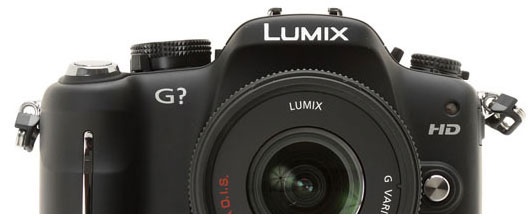
After sample Images its time for some High ISO Samples, I am not a fan of Panasonic Mirrorless but the new GH3 is giving nice and clean image at High ISO setting, see some sample below, more gallery links at the end.
Panasonic GH3 Video is leaked by Panasonic US, thanks to 43rumors for catching this, the new Pansonic GH3 is coming with
New Venus engine
New 16 Megapixel Live MOS sensor
High Defination Video 60p/50p
Bitrate All-I:72MBPS
Dust and Splash proof Mag Alloy Body / see the full specification after the video
See the leaked GH3 video below
Panasonic GH3 full specification:
– 16 Megapixel “Wide dynamic range” CMOS Sensor.
– New Venus 7 engine
– electronic shutter
– ISO 100-12.800
– 6fps
– Fastest AF of any interchangeable lens system camera.
– Video Bitrate 50Mbps (72Mbps ALL-I)
– 30p/25p in MP4, MOV and AVCHD
– 3.5 Mic in
– built-in stereo mic
– Audio out
– Pc control
– Time Code
– 1740k OLED LVF, Touch Monitor OLED 610k.
– external battery grip
– Wifi with remote control through iOS and Android Applications
– external XLR accessory
– Focus Peaking
– Interval shooting and slow motion. Slow Movie extension (40%, 50%, 80%) Fast 160/ 200 / 300%
– Magnesium alloy body. Bod
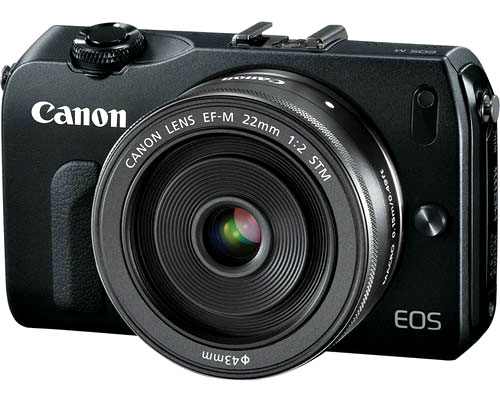
See the details behind the Canon EOS M Mirrorless camera, also see the specification sheet of canon EOS M mirrorless camera EOS M specification sheet
Canon CMOS sensor
Exclusively designed and manufactured by Canon to work in combination with its own DIGIC processors, Canon’s CMOS technology integrates advanced noise reduction circuitry at each pixel site, delivering virtually noise-free images. In comparison with CCD technology, the lower power consumption characteristics of Canon’s CMOS sensors also contribute to longer battery life. Signal conversion in Canon’s CMOS sensors is handled by individual amplifiers at each pixel site. Unnecessary charge transfer operations are avoided, vastly speeding up the process of getting the signal to the image processor. Noise is reduced, power consumption is limited and faster frame rate potential is increased.
The EOS M APS-C sensor features a new Hybrid AF System with a total of 31 AF points which uses the central pixels of the sensor to enable continuous AF when shooting in Live View Mode or when recording EOS Movies
1. The Hybrid AF system uses a combination of both phase detection and contrast AF to ensure quick and accurate auto focus. The new sensor design also produces DSLR-level image quality at both high and low ISO sensitivities, with 14-bit AD conversion for finer tonal gradation.
DIGIC 5 Image Processor
The latest generation of Canon’s DIGIC processor – DIGIC 5 – has been engineered to process more detailed image data faster than ever before, accurately reproducing every part of the scene with natural colours and smooth tones. Processing image data six times faster than its predecessor, the power of DIGIC 5 featured in the EOS M enables photographers to utilise a range of advanced shooting settings and modes to enhance image quality or creative scope. For example, with DIGIC 5, the EOS M is able to shoot high resolution stills continuously at 4.3 frames per second, capture low-light images at ISO 12800 with minimal noise and enable new features including HDR Backlight Control. Live View shooting
The EOS M features a 7.7cm (3.0”) 3:2 Clear View LCD II Touch screen which gives photographers the ability to easily compose shots. Photographers are able to choose from a number of onscreen displays and effectively compose and review shots in a number of ways:
Exposure control – Different metering methods (evaluative, partial, spot and centre-weighted average metering) can be selected, ISO speed is displayed. The results of the exposure settings are also previewed on the screen, allowing users to view the final image prior to pressing the shutter release button.
Grid display – A choice of two different grid displays divides the screen into either nine or 24 areas, perfect for composing perfectly balanced shots.
Multi aspect ratios – Photographers can select from four different aspect ratios, 3:2, 4:3, 16:9 and 1:1 which will then be displayed on the screen to assist in framing each shot. When shooting in JPEG format, the image will be captured in the chosen aspect ratio, whilst images shot in RAW will be transformed to the chosen aspect ratio when using DPP.
31-point Hybrid AF System The EOS M features a 31-point Hybrid AF System that delivers super-fast, accurate AF when shooting both images and movies. The EOS M’s CMOS sensor couples Phasedifference AF with Contrast AF to provide a fast and highly-accurate Hybrid Autofocus system. During both stills and movie shooting, Phase-difference AF provides high-speed focus, using the central part of the CMOS sensor. Contrast AF, which focuses using the wider scene, then provides the final stage of focusing for enhanced accuracy. The EOS M offers photographers One-shot AF or Servo AF operation as well as a collection of different AF methods to ensure an optimised approach to focusing on every different subject. The AF methods include:
Face detection and tracking – Automatically detects and focuses on faces in the frame and tracks movement by switching between AF points. Photographers can control where the camera focuses by selecting points on the camera’s LCD.
FlexiZone – Multi – Automatically divides the frame into 31 different AF zones and uses an algorithm to prioritise focus on the centre and closer parts of the subject. Users can select one of nine AF zones to change the area of focus
FlexiZone – Single – The standard AF mode that allows photographers to select any AF point on the LCD touch screen.
Focus Adjustment after AF – Similar to Full-Time Manual focus found on EOS DSLR models, once the automatic AF has been established, the camera automatically changes to manual focus, allowing photographers to manipulate the image.
Touch AF and Touch Shutter Release – photographers can simply touch the display to pinpoint the area on which the camera should focus and instantly capture a still image.
EF-M lenses and EF lenses
The EOS M features a new, bespoke EF-M mount diameter which has been optimized for APS-C sized sensors. However, photographers have the freedom to explore the Canon EOS System of more than 70 EF lenses thanks to the new Mount Adapter EF-EOS M. In addition, two new EF-M lenses have been specially engineered for the EOS M, offering photographers the ideal compact lenses to take with them wherever they go.
The new lenses are:
EF-M 18-55mm f/3.5-5.6 IS STM – an 18-55mm standard zoom
EF-M 22mm f/2 STM – a 22mm pancake lens
EOS Movie – EOS Movie allows users to record Full HD (1920x1080p) movies with full manual control of exposure and frame rates of 30, 25 and 24 fps at full resolution, with 60 and 50 fps available at 720p resolution.
The EOS M also features high speed AF in Movie mode, with three AF methods used to capture sharp, detailed movies. The AF in Movies functionality uses the phasedifference AF which uses the central part of the CMOS sensor to achieve rapid focus. AF in Movies uses the following AF methods to achieve optimal focus:
Face detection and Tracking
FlexiZone – Multi
FlexiZone – Single
The EOS M features a built in stereo microphone in order to record sharp, crisp audio to compliment the visuals. The microphone is located to the left of the EOS M’s hot shoe so it can easily capture audio, while the sound recording menu features an attenuator to automatically reduce any sudden loud noises. Photographers can also enable a wind filter which works by reducing the recording level to below the 100Hz frequency.
Audio is recorded at a sampling frequency of 48KHZ, 16-bit, and photographers have the ability to switch the recording level between Auto and Manual, the latter giving the choice of 64 sound levels. For budding movie makes, the EOS M also features a 3.5mm Stereo mini plug which allows users to plug in a compatible external microphone.
Video Snapshot – The Video Snapshot feature enables the user to capture short video clips of 2, 4 or 8 seconds in length. These short snapshots are then stitched together into one file as a Video Snapshot Album, creating a dynamic, fast-paced movie sequence. Once video clip duration has been selected, every time the Movie shooting button is pressed a video clip of that length will be captured. For example, if a 4 second Video Snapshot is selected, the Video Snapshot Album will be created consisting of 4 second movie clips. When playing a Movie, Video Snapshot Album or Slideshow, background music (BGM) can be applied, whether on the camera’s touch screen, or on a larger HDTV using the camera’s HDMI connection. To do this, users must convert audio files to the supported .WAV format, before using EOS Utility software to upload the files to the camera’s SD card ready for selection during playback. A choice of five music tracks supplied with the camera can also be used. With the EOS M, users can now also edit video snapshots, changing the order or deleting clips in-camera.
Clear View LCD II Touch screen : The EOS M features a 7.7cm (3.0”) 3:2 Clear View LCD II Touch screen which employs capacitive technology to support natural, gesture-based control during shooting and playback – providing support for multi-touch gestures including pinching, swiping and dragging. The new touch interface allows users to touch-select AF points, track faces and objects, use Touch Shutter to take pictures directly from the screen interface or adjust image settings instantly with the Quick Control screen.
The screen itself offers an approximate resolution of 1.04 million dots, allowing highquality viewing of images, and focus checks, in playback. A solid construction eliminates the layer of air between the LCD and its hardened glass protective cover, reducing reflections. Additionally, an anti-smudge coating ensures marks on the screen are prevented and colours on the monitor appear natural and close to the sRGB colour space.
Multi Shot Noise Reduction: With Multi Shot Noise Reduction, the EOS M captures four shots in quick succession and combines them to produce a single image with minimal noise. This new function has been designed to be more effective than Strong Noise Reduction.
EOS Scene Detection Technology : EOS Scene Detection Technology automatically analyses faces, brightness, movement, contrast and distance in the scene, with information provided as feedback to the Scene
Intelligent Auto mode – Scene Intelligent Auto Scene Intelligent Auto takes the information gathered by the EOS Scene Detection System and determines the best settings to capture the scene. For example, when shooting portraits, the settings are adjusted to make skin tones appear more natural.
Picture Styles – Picture Style presets can be likened to different film types – each one offering a different colour response. Within each selectable preset, photographers have control over sharpness, contrast, colour tone and saturation. The camera’s Standard Picture Style is designed to deliver immediately-usable JPEG images without the need for additional
processing. When shooting RAW images, Picture Styles can be revised with Canon’s Digital Photo Professional software. The presets available with the EOS M are:
Standard: For crisp, vivid images that don’t require post-processing.
Portrait: Optimises colour tone and saturation and weakens sharpening to achieve attractive, natural skin tones.
Landscape: For punchier greens and blues with stronger sharpening to give a crisp edge to mountain, tree and building outlines. Neutral: Ideal for post-processing.
Faithful: Adjusts colour to match the subject when shot under a colour temperature of 5200K.
Monochrome: For black and white shooting with a range of filter effects (yellow, orange, red and green) and toning effects (sepia, blue, purple and green. The EOS M also features Picture Style Auto. This new Picture Style makes fine adjustments, based on the EOS Scene Detection System’s analysis, to create a Picture
Style for the image. Three User Defined Picture Styles can be selected to store customised pre-sets created using the supplied Picture Style Editor, or any of the presets available for download from Canon’s web site: www.canon.co.jp/Imaging/picturestyle/file/index.htm
Basic+ – Basic+ makes it easy for newcomers to photography to create different image effects, without changing individual settings, allowing users to shoot by ambience selection or according to lighting or scene type. When shooting according to ambience selection, users can select from one of nine effects: Standard Setting, Vivid, Soft, Warm, Intense, Cool, Brighter, Darker,
Monochrome – When shooting according to lighting or scene type, users can select from one of seven settings which present white balance in a more user-friendly way: Default setting, Daylight, Shade, Cloudy, Tungsten Light, Fluorescent Light, Sunset.
Creative Filters – The EOS M provides a range of creative effect filters which can be applied to RAW images and all JPEG images. Since the filter can be applied after the shot is taken, users can apply different filters to the same image and see the effects:
Art bold effect (Low/Standard/Strong): Creates an “oil painting” type effect with the ability to adjust the contrast and colour saturation.
Water Painting effect (Light/Standard/Deep): Creates a “watercolour painting” effect with soft colours. You can adjust the colour density according to three levels of intensity.
Fish-eye effect: Creates a barrel-shaped distortion similar to a fish-eye lens. The effect can be adjusted, and, depending on the level of distortion, the image periphery may be cropped. Grainy B/W: Creates a grainy, black-and-white image. The effect can be emphasised by adjusting the contrast.
Soft focus: Produces a soft result. This can be increased by adjusting the blur. Toy camera effect: Provides colour cast typical of toy cameras. The four corners are also darkened. The image looks soft with a subtle grainy look. The colour cast can be changed to cool or warm colours.
Miniature effect: Gives the effect of a very narrow depth of field, making the scene look like a small-scale model. When shooting, designated portions of the top and bottom of the image are blurred, while the rest of the image remains in focus. The orientation (vertical or horizontal) of the area can be changed by pressing the INFO button.
ImageBrowser EX : ImageBrowser EX is a software programme for viewing, editing and organising images and is intended for users who shoot mainly in JPEG format. It merges the popular functionality of ZoomBrowser EX and ImageBrowser into one programme, enabling users to perform basic image editing, including brightness and colour balance, with an in-software connection to DPP for RAW image editing. Users can also select, rename, and resize multiple images at once, and print images via a range of simplified integrated printing options.
EX Speedlite flash compatibility : The EOS M features a hot shoe that offers instant compatibility with Canon’s range of EX Speedlite flash units. A new compact Speedlite, the Speedlite 90EX, offers a new a guide number of 9, as well as optional wireless control for more creative flash.
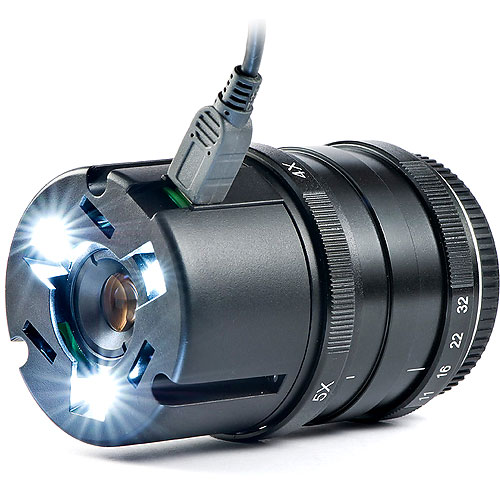
Nanoha 5X is a super macro lens that do a superb 5X magnification, The lens is developed by the Japanese company Yasuhara. Nanoha 5X come for Sony NEX (A-Mount) and micro 4/3 mount, you get aperture range from F11 to F32, composed of 10 optical elements in 7 groups. The lens is made of plastic front and metal body, front of the lens have 3 LED lights powered by a external battery via USB wire, Overall weight is 320 grams only.
NANOHA 5X ultra macro lens M43 -quick and first hands-on
EXCLUSIVE ! NANOHA 5X ultra macro lens M43 -quick and first hands-on
Camera used and other details: Panasonic GH2 720P
Nanoha 5X macro lens f/11 (f/11, f/16, f/22 and f/32)
310 g (with lighting unit) lens weight
diameter 61mm, lenght 84mm
additional shot with Voigtländer 25mm f/0.95
No CC
sorry for the credit in the movie, the name is “Nanoha”, of course !:)
Music : Add N to X “Gentle Germans”
Read more Outside
Review: Yasuhara Nanohax5 5x Macro Lens (Micro Four Thirds) at thephoblographer.com
Nanoha 5X Lens Review at megapixel.co.il
Panasonic G5 will arrive in next few week or at May 21st, 2012 with 75mm F1.8 lens, Panasonic XZ-2 and LX-7 is also expected to arrive soon. Still we have no confirmed news but Panasonic G5 will use the same G3 16 Mp sensor with advance image processor.
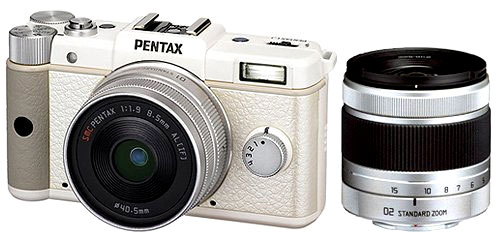
According to RayGunn, (member of pentax forum) B&H rep told him that Pentax Q has been discontinued by the manufacturer,
I have just, this morning, been told the Pentax Q has been discontinued by the manufacturer. Went to the B&H website last night to order the Pentax Q, because of the latest price announced here, but the Q was nowhere to be found on their website. I did see the 02 lens price increased from $252 to $399, though.
When I called B&H this morning, I asked the salesman to order the Pentax Q for me, at the newly announced “low” price. After a short wait, he told me it wasn’t on any of his lists and must be temporarily out of stock. I asked him to check on when more stock was expected and he placed me on hold. After about a three minute wait, he came back
on the line and told me his manager told him the Pentax Q has been discontinued by the manufacturer.
So, the question I now have is: Is the Q completely discontinued or will there be a new model?
Buy Canon Lenses, Buy Music CD or Digital Camera at amazon it helps this site, and you do not pay anything extra, it is just a way to help support this site.
New Camera Website, we list all type of new camera information, price review and all type camera rumors, subscribe us or follow us via twitter or facebook.
Disclaimer: We have attempted to select useful information to include on New Camera, and to ensure that the resources we have included on the site -- as well as the way we have described them -- are accurate, fair, and balanced. However, we make no claims, warranties, or other representations concerning the accuracy, completeness, or utility of the information provided, or concerning the abilities or performance of the organizations, agencies, companies, and other resources presented through New Camera

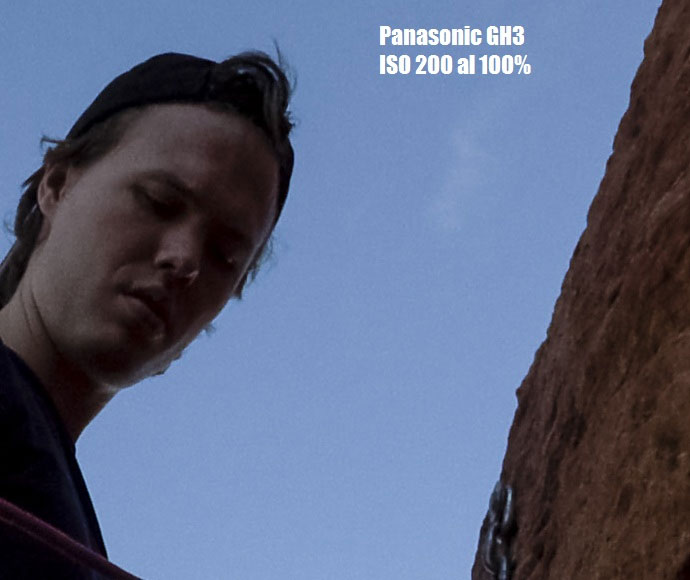

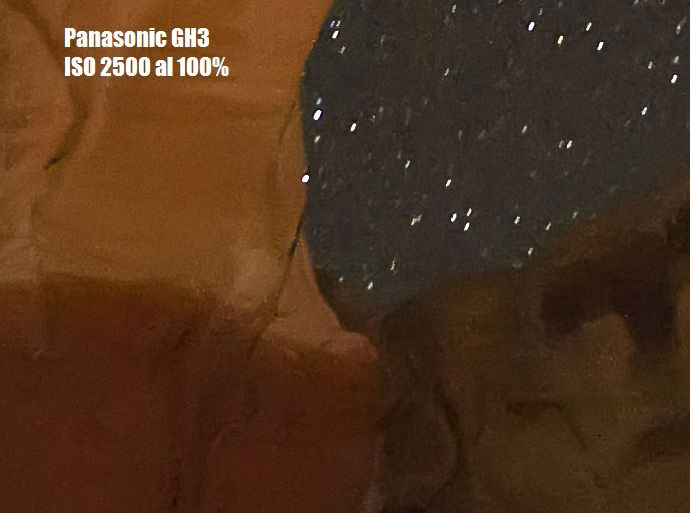
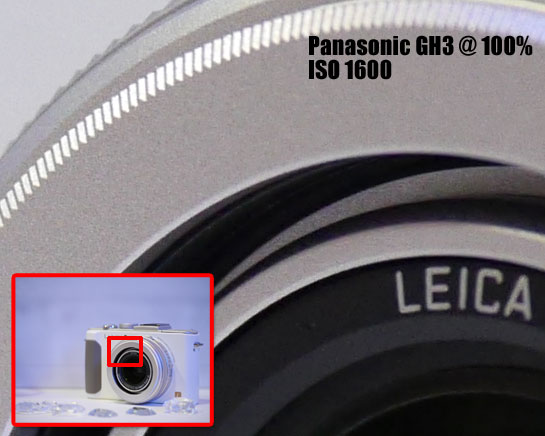 F2.8, ISO 1600, 1/200s, EV +1 | (With LUMIX GX Vario 35-100mm F2.8 Power OIS HD)